


Vox Reader / Huawei Android
Your books.
A voice.
No Wi-Fi needed.
Turn your own EPUB books and documents into listening time. Vox Reader generates speech on your Huawei phone, with voices included.
One hour free each day. Optional one-time unlimited Pro.
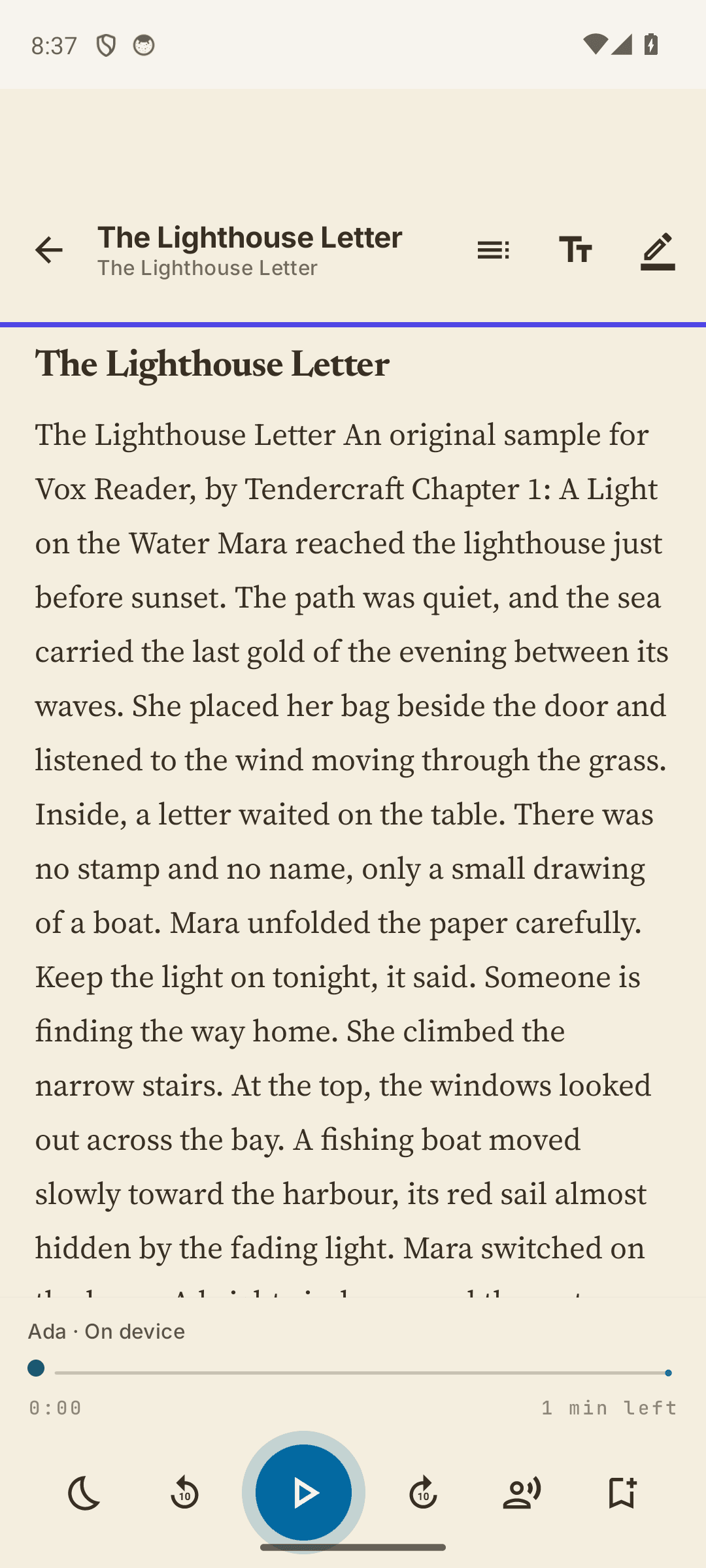
Read your own text; no audiobook catalogue required.
Listen offline
Bundled voices generate speech on your phone after installation.
Keep your text local
Your imported books are not uploaded for speech generation.
Try your own book first
An hour of free listening every local day. No login for free reading.
From file to listening
Bring a book.
Find your rhythm.
Follow the sentence highlight, change the speed, save a bookmark, and return to your place.
- 01
Import your text
Open Import, tap Choose document, and select a DRM-free EPUB, TXT, text-based PDF or DOCX file on your phone.
- 02
Press Play
Open the imported book and allow the voice a moment to prepare. Use a short English sample to try the sound and controls.
- 03
Take it offline
After import, switch off Wi-Fi and mobile data and try a few sentences. Reconnect for Huawei sign-in, purchase or restoration.
A short story to try
Download our original sample, import it as TXT, and hear how reading aloud works with a document of your own. The same file is used in our walkthroughs.
Start free. Listen longer with Pro.
Free
One hour of listening per day
- DRM-free EPUB, TXT, text-based PDF and DOCX import
- On-device voices and offline reading
- Sentence highlighting, bookmarks and saved position
- On-screen reading without a listening timer
Vox Pro
Unlimited listening · One-time purchase
- Removes the Huawei daily listening limit
- No recurring subscription
- Purchased and restored through Huawei
- Current regional price shown in the app
Pro requires a connection, HMS Core and a supported HUAWEI ID in an available region. Once ownership is retrieved, cached Pro works offline. Windows and Huawei purchases are separate. This is the AppGallery Android edition, not a HarmonyOS NEXT app.
A little help getting started
Huawei guidesHow to read EPUB books aloud offline on Huawei
Import a DRM-free EPUB into Vox Reader on a Huawei Android phone, start listening, and check offline playback before your next trip.
Read the guideHow to read a PDF aloud on a Huawei phone
Check whether your PDF contains selectable text, import it into Vox Reader for Huawei, and troubleshoot scans, columns and reading order.
Read the guideVox Reader Huawei Pro: sign in and restore a purchase
Find the HUAWEI ID sign-in option in Vox Reader, restore a previous Pro purchase, and understand which features require internet access.
Read the guideFind your way around
Silent interface walkthroughs from the signed Android release in an emulator. Idle footage is trimmed; the import walkthrough ends with a still of the imported book. These show the controls, rather than physical Huawei playback speed or voice quality.
Choose and open an EPUB
Open Import → Choose a document, select your saved DRM-free EPUB, then open the imported book.
Find the reading themes
Open a book, tap Text appearance near the top right, then choose a reader theme or font.
Before you press Play
Use documents you own or have permission to read. DRM-protected books are not supported. Scanned PDFs need text recognition; columns and complex layouts can affect reading order. The voices are built in, making the download about 227 MB. Voice preparation and playback performance vary by phone.
Does Vox Reader work offline on Huawei phones?
Yes. The AppGallery Android edition includes its voices and generates speech on your phone. After installation, imported books can be read aloud without Wi-Fi or mobile data. Buying or restoring Pro needs a connection, HMS Core and a supported HUAWEI ID.
How much listening is free?
The Huawei edition includes one hour of listening per local calendar day. Reading on screen is not timed. Optional Vox Pro removes the listening limit with one purchase; there is no recurring subscription. Huawei displays the current price for your account and region.
Do I need to sign in?
Free reading needs no Vox Reader account or app login. To buy or restore Pro, open Settings and use Sign in to HUAWEI ID. Huawei handles account access and payments through HMS Core.
Can Vox Reader read EPUB and PDF files aloud?
It imports DRM-free EPUB and TXT files, text-based PDF documents and DOCX files in the Huawei edition. Password protection, DRM and complex layouts can prevent useful text extraction. A scanned image-only PDF needs text recognition before it can be read as ordinary text.
Does it include audiobooks or play MP3 files?
Vox Reader generates speech from the text you import. It does not include a commercial audiobook catalogue, play prerecorded audiobook files or export speech as MP3.
Are my books uploaded for speech generation?
No. The Huawei edition reads imported text on your device and has no internet permission. Huawei account and payment services run separately through HMS Core. Keep your own backup of documents you want to preserve.
Why is the download about 227 MB?
The AppGallery Android package includes the voice models so reading aloud works offline after installation. Leave additional free space for installation and your own books. AppGallery shows the current download size and compatible devices.
Does Windows Pro also unlock Huawei Pro?
No. The Huawei and Windows editions use separate stores, free allowances and purchase entitlements. A Microsoft Store licence does not unlock the AppGallery edition, and a Huawei purchase does not unlock Windows.
Give your next chapter a voice.
Try the free hour with a book you already want to read.
Get Vox Reader on AppGalleryBuilt and supported by Tendercraft.