


Vox Reader
Listen to books and documents in natural neural voices without sending a single sentence to the cloud.
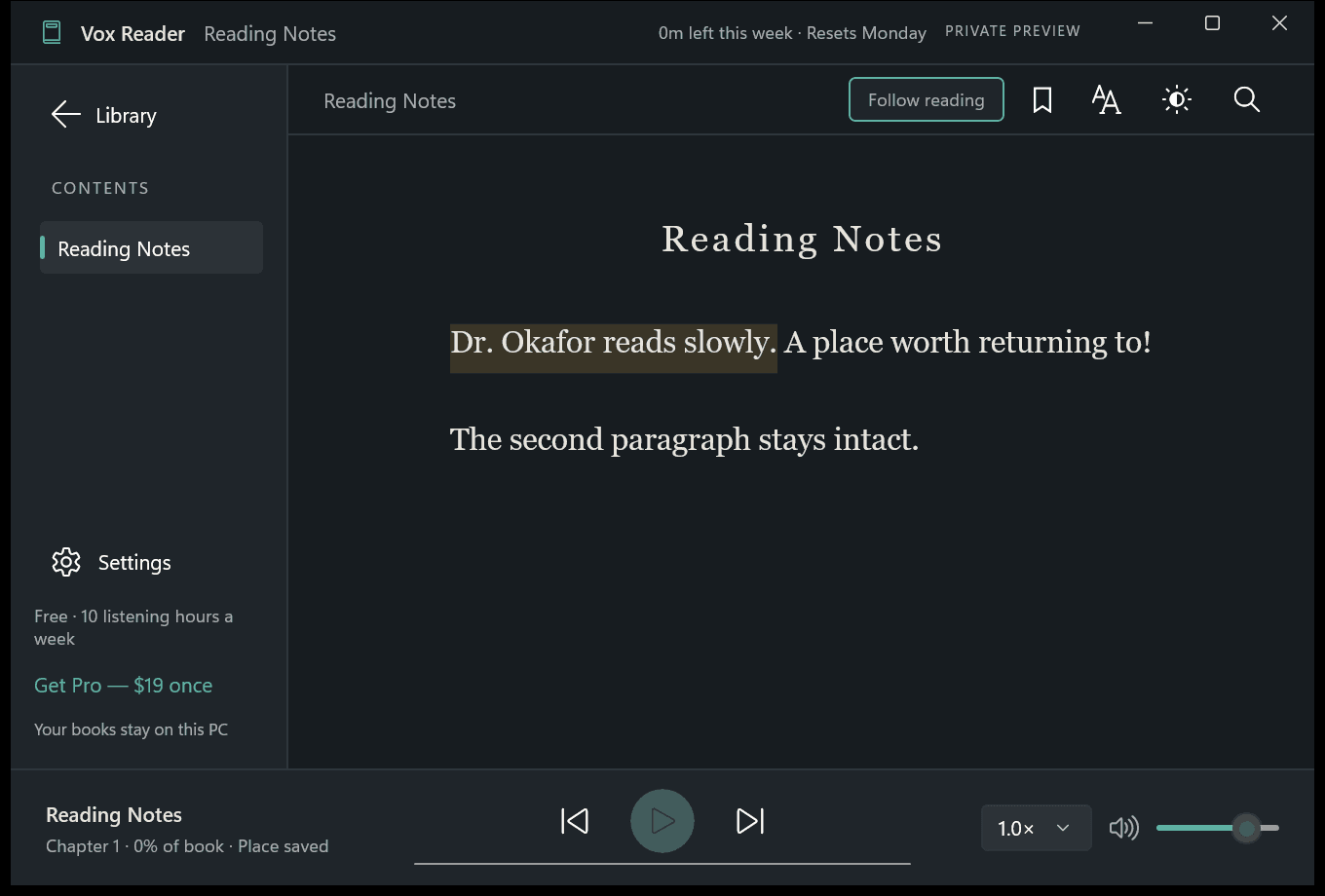
Dark mode reader view with real-time sentence illumination, audio waveform, and precision playback controls.
Watch Vox Reader in Action
See synchronized sentence tracking and neural voice playback in a real reading session.
Why an Offline Neural Reader?
The Cloud TTS Problem
Mainstream reading apps charge $10 to $15 every month ($120+ annually) and require constant internet connectivity. Every book chapter, personal document, or work contract you read aloud is transmitted to their remote servers for voice processing.
The Vox Reader Difference
Vox Reader runs modern lightweight neural TTS models directly on your Windows PC. Voice synthesis happens instantaneously without cloud lag, works completely offline, protects your confidential documents, and offers an honest lifetime purchase.
Key Features Built for Readers
On-Device Neural Synthesis
High-fidelity English voices running natively on your CPU. Natural inflection and cadence without robotic mechanical tones.
Synchronized Highlighting
Follow along effortlessly. Sentences illuminate in real time as the audio voice speaks, supporting reading focus and ADHD comprehension.
Format Freedom
Import DRM-free EPUB ebooks and TXT files free. Pro unlocks text-based PDF documents and Microsoft Word (.docx) files.
Playback & Speed Controls
Fine-tune reading speed from 0.5× up to 3.0×, set automatic sleep timers, skip 15 seconds backward or forward, and save bookmarks.
100% Air-Gapped Privacy
Zero cloud telemetry, no analytics, no accounts. Documents, bookmarks, and reading history remain entirely on your local machine.
Custom Pronunciation Editor
Easily customize how fictional names, acronyms, technical terms, or medical jargon are spoken across your library.
Vox Reader vs. Mainstream Alternatives
How Vox Reader stacks up against popular cloud text-to-speech services.
| Capability | Vox Reader | Speechify | NaturalReader | Browser Extensions |
|---|---|---|---|---|
| Runs 100% Offline | ||||
| Personal Documents Never Uploaded | ||||
| No Account or Registration Required | ||||
| One-Time Payment Option ($18.99 Lifetime) | ||||
| Annual Cost | $0 (or $18.99 once) | $139.00 / year | $119.88 / year | $0 - $49 / yr |
| EPUB, TXT, PDF, & DOCX Support | ||||
| Synchronized Sentence Highlighting | ||||
| Zero Telemetry & Zero Ads |
Frequently Asked Questions
Does Vox Reader work completely without an internet connection?
Yes. High-quality neural voice synthesis runs 100% locally on your computer’s CPU/GPU using packaged on-device neural models. Once installed from the Microsoft Store, you can use Vox Reader completely offline on flights, commutes, or in air-gapped environments.
How does the free tier work?
Vox Reader provides a generous free tier that gives you 3 hours of natural neural voice playback every single week, resetting automatically every Monday. You can read, search, bookmark, and organize your entire EPUB and TXT library without ever paying. The optional Pro upgrade ($18.99 one-time) unlocks permanent unlimited listening, all 11 English voices, custom pronunciations, and PDF/DOCX import.
Is there a recurring monthly or yearly subscription?
No. There is zero subscription fatigue. Unlike cloud services that charge $10 to $15 every month forever, Vox Reader Pro is a single one-time lifetime license fulfilled securely through the Microsoft Store.
Are my books or personal documents uploaded to any remote server?
Never. Vox Reader has no cloud servers, no account registration, no document upload endpoints, and zero telemetry. All text processing and audio generation happens exclusively in local device memory.
What document formats can I listen to?
The free tier supports DRM-free EPUB ebooks, plain text files (.txt), and text pasted directly from the clipboard. The Pro tier adds support for text-based PDF documents and Microsoft Word (.docx) files.
What are the system requirements?
A 64-bit PC running Windows 10 (version 2004 or later) or Windows 11. Speech runs natively on your CPU, so no specialized discrete GPU is mandatory.
Related Guides & In-Depth Walkthroughs
How to Listen to EPUB & PDF Books Offline on Windows 11 & 10 →Offline voice synthesis models are bundled with the software and execute on-device. No network connectivity is initiated during voice generation.
Start Listening on Your Windows PC
Download Vox Reader free from the Microsoft Store today. 3 hours of listening included every week with zero subscriptions.