


Cropmark
The modern Windows screenshot tool built for technical writers, engineers, and privacy-conscious professionals.
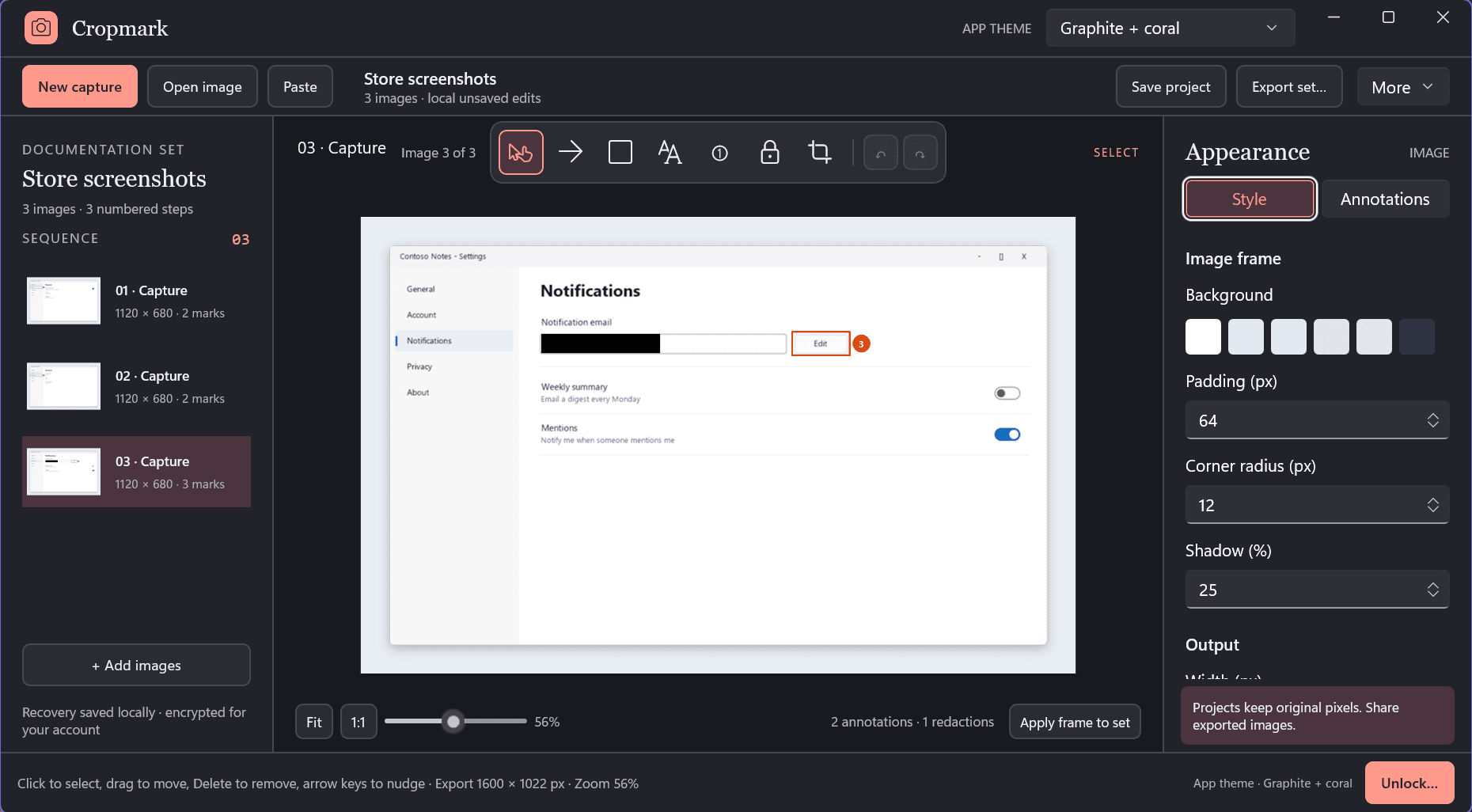
Coral markup palette: auto-incrementing step badges, true redaction, and drop-shadow styling.
Watch Cropmark in Action
See verified destructive pixel redaction, numbered step badges, and instant export in action.
Why Superficial Redaction Fails
The Insecure Overlay Risk
Standard capture tools frequently leave original image data intact behind black rectangles, transparent alpha channels, or recoverable crop buffers (CVE-2023-28303 / Acropalypse). Adjusting exposure or reading raw bytes can expose confidential API keys, customer PII, and passwords.
True Bitmap Pixel Erasing
Cropmark applies true destructive redaction. Covered pixels are zeroed out directly in the underlying memory bitmap buffer before compression or export. No tool, filter, or binary inspection can ever recover what was erased.
Designed for Clarity and Precision
Destructive Pixel Redaction
Permanently zeroes out sensitive credentials, emails, and balances before file creation. The app verifies pixel destruction prior to saving.
Auto Numbered Step Badges
Document bug repros and user guides with clean numbered callouts (1, 2, 3...) that increment automatically on click.
Multi-Page PDF Export
Bundle multiple sequential screenshot steps into a single, clean paginated PDF document without leaving the application.
Canvas Border & Shadow Styling
Turn raw screen snippets into documentation-ready assets with optional canvas padding, rounded corners, and subtle elevation shadows.
Multi-Image Projects & Batch Export
Work on complex walkthroughs with multiple images simultaneously. Apply consistent style presets across all images in one click.
Zero Cloud Dependencies
No mandatory cloud accounts, no auto-uploading to public URLs, no background telemetry. Everything remains local on your PC.
Cropmark vs. Common Windows Screenshot Tools
Compare Cropmark against Snipping Tool, Snagit, ShareX, and Greenshot.
| Capability | Cropmark | Snipping Tool | Snagit | ShareX | Greenshot |
|---|---|---|---|---|---|
| True Destructive Redaction (Zeroed Pixels) | Partial | ||||
| Acropalypse-Safe Memory Buffer Wiping | |||||
| Auto-Incrementing Numbered Step Badges (1, 2, 3...) | |||||
| Merge Screenshots into Multi-Page PDF | |||||
| Zero Watermarks on Exports (Free & Pro) | Watermarks on trial | ||||
| Annual / Lifetime Price | $0 (or $18.99 once) | Free with Windows | $39.00 / yr or $79 | Free (Donation) | Free (Donation) |
| Native Modern WinUI 3 Architecture | |||||
| Zero Analytics, Cloud Accounts or Telemetry |
Frequently Asked Questions
How is Cropmark redaction different from standard screenshot markup tools?
Standard screenshot tools often draw a black or blurred rectangle directly over sensitive image pixels as an overlay layer. In many cases, or when adjusted with contrast and brightness filters, the underlying data remains accessible (such as in the well-documented Acropalypse vulnerability). Cropmark permanently zeroes out and overwrites the covered bitmap pixels in memory before file export, ensuring data recovery is mathematically impossible.
Are exported screenshots watermarked?
Never. Both the Free version and Cropmark Pro export pristine, publication-grade PNG, JPEG, and PDF documents with zero branding watermarks.
What additional capabilities does Cropmark Pro provide?
Cropmark Free includes full region and window capture, annotations, arrows, numbered steps, destructive redaction, and single-image PDF export. Pro ($18.99 one-time or $9.99/year) adds multi-image project management, batch export across multiple captures, and merging several screenshots into a single paginated PDF document.
Does Cropmark require an internet connection or user account?
No. Cropmark is built as a local-first native Windows desktop application using Microsoft WinUI 3. It runs entirely offline, requires no login or cloud account, and transmits zero telemetry or user data.
What are the system requirements?
Cropmark requires a 64-bit PC running Windows 10 (version 2004 or higher) or Windows 11. It natively supports multi-monitor setups and dynamic high-DPI scaling.
Related Guides & In-Depth Walkthroughs
How to Permanently Redact Screenshots on Windows (Acropalypse-Safe) →Native Windows app built with WinUI 3 and .NET 8. Exports clean PNG, JPEG, and PDF files directly to your storage without telemetry.
Capture, Redact, and Export with Confidence
Download Cropmark free on the Microsoft Store. Never leak confidential credentials or send unverified screenshots again.